Thursday, 17 June 2010

Displaying Date

Steps:

Maintain Folder Structure


GoTo your folder DisplayDate
under src folder
create java file DisplayingDate.java

import java.io.*;
import java.util.*;
import javax.servlet.*;
import javax.servlet.http.*;

public class DisplayingDate extends HttpServlet
{
 public void doGet(HttpServletRequest request, HttpServletResponse response) throws ServletException, IOException
 {
  PrintWriter pw=response.getWriter();
  Date today=new Date();
  pw.println("<html>"+<body><h1>Today Date is</h1>");
  pw.println("<b>"+today+"</b></body>"+"</html>");
 }
}

Compile this program.
javac DisplayingDate.java

import java.io.*;
import java.util.*;
import javax.servlet.*;
import javax.servlet.http.*;

public class DisplayingDate extends HttpServlet
{
 public void doGet(HttpServletRequest request, HttpServletResponse response) throws ServletException, IOException
 {
  PrintWriter pw=response.getWriter();
  Date today=new Date();
  pw.println("<html>"+"<body><h1>Today Date is</h1>");
  pw.println("<b>"+today+"</b></body>"+"</html>");
 }
}

Again compile:
javac DisplayingDate.java

We got errors that packages does not exist
package  javax.servlet.
package  javax.servlet.http.
Because we have not set the class path.
So set the class path
E:/DisplayDate/src>set classpath=C:\Program Files\Apache Software Foundation\Tomcat 8.0\lib\servlet-api.jar;
now compile the program
javac DisplayingDate.java

Now ok.
Go to WEB-INF folder
open web.xml file
<web-app>
 <servlet>
  <servlet-name>Hello</servlet-name>
  <servlet-class>DisplayDate</servlet-class>
 </servlet>
 <servlet-mapping>
 <servlet-name>Hello</servlet-name>
 <url-pattern>/DateDisplay</url-pattern>
</servlet-mapping>
</web-app>

-->Save the file
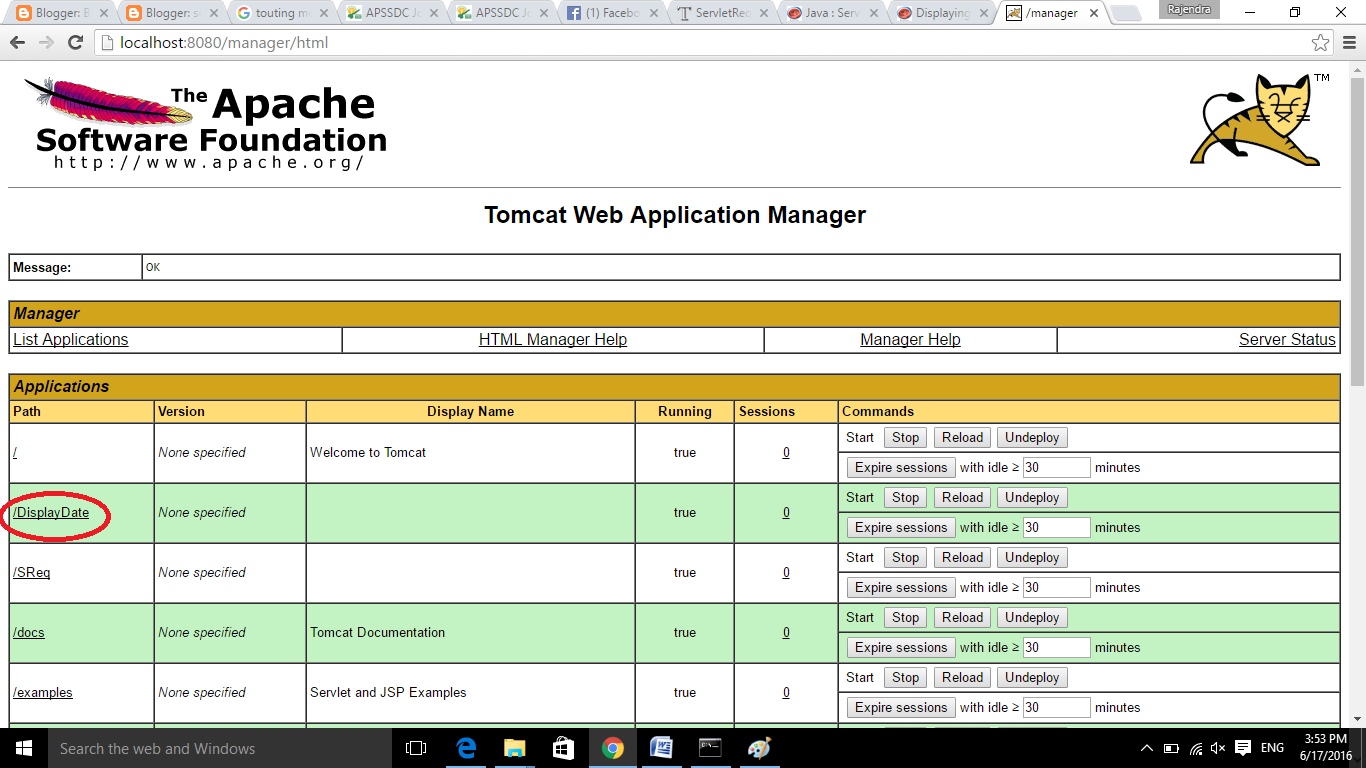
Deploy your project (folder) DisplayDate into Servler
Go to apache tomcat server folder


Start the server:


Go to any browser:
and type your local host with port no
http://localhost:8080/


type user name and password; (at the time of installing tomcat server we should set the username and password.)
here my username is: root
password is root.


Tuesday, 15 June 2010

How many ways to develop servlet programs

There are three ways to develop

1. Take Java class implementing javax.servlet.Servlet(Interface) and provide implementation to all the 5 methods of that interface

2. Take a java class extending from javax. servlet.GenericServlet(class) and provide implementation to public void service(-,-) method.

3. Take a Java class extending from javax.servlet.HttpServlet(class) and override one of the seven (7) doXXX(-,-) methods.

How many types of servlets?

There is a possibilities of developing 'n' types of servlets like httpServlet, ftpservlet, smtpServlet and etc,...for all these protocals are specific servlet classes.
GenericServlet is the super class contains common properties and logics. 

Monday, 14 June 2010

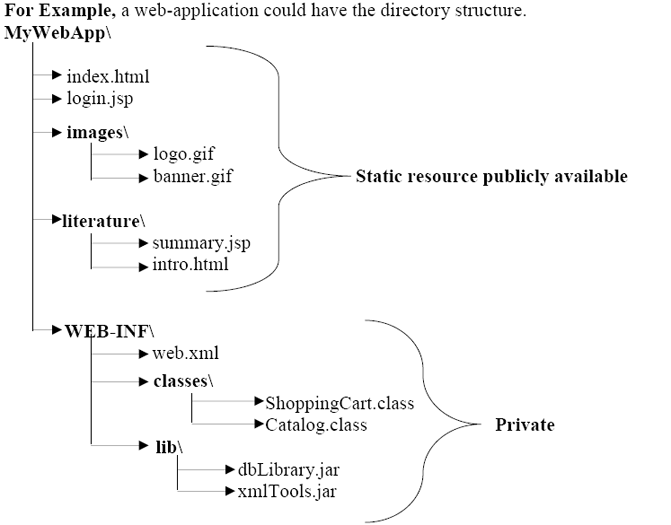
Web Application Folder Structure


Work flow of Servlet

Work flow of Servlet

The server checks if the servlet is requested for the first time.
If yes, web container does the following tasks:
loads the servlet class.
instantiates the servlet class.

calls the init() method passing the ServletConfig object
else
calls the service() method passing request and response objects

The web container calls the destroy method when it needs to remove the servlet such as at time of stopping server or undeploying the project.

How web container handles the servlet request?
The web container is responsible to handle the request. Let's see how it handles the request.
maps the request with the servlet in the web.xml file.
creates request and response objects for this request
calls the service method on the thread

The public service method internally calls the protected service method
The protected service method calls the doGet method depending on the type of request.
The doGet method generates the response and it is passed to the client.
After sending the response, the web container deletes the request and response objects. The thread is contained in the thread pool or deleted depends on the server implementation.

What is written inside the public service method?
The public service method converts the ServletRequest object into the HttpServletRequest type and ServletResponse object into the HttpServletResponse type. Then, calls the service method passing these objects. Let's see the internal code:

public void service(ServletRequest req, ServletResponse res) 
        throws ServletException, IOException 
    { 
        HttpServletRequest request; 
        HttpServletResponse response; 
        try 
        { 
            request = (HttpServletRequest)req; 
            response = (HttpServletResponse)res; 
        } 
        catch(ClassCastException e) 
        { 
            throw new ServletException("non-HTTP request or response"); 
        } 
        service(request, response); 
    } 


What is written inside the protected service method?
The protected service method checks the type of request, if request type is get, it calls doGet method, if request type is post, it calls doPost method, so on. Let's see the internal code:

protected void service(HttpServletRequest req, HttpServletResponse resp) 
        throws ServletException, IOException 
    { 
        String method = req.getMethod(); 
        if(method.equals("GET")) 
        { 
            long lastModified = getLastModified(req); 
            if(lastModified == -1L) 
            { 
                doGet(req, resp); 
            }  
    .... 
    //rest of the code 
        } 
    } 


You may like the following posts:
Web Container

How to access your Web Application in other systems

I would like to make available to other to access my web application:

1. Once your web application is ready
2. Go to command prompt
3. type ifconfig (press enter)

Note down your Computer  IP Address. for example: IPv4 Address. . . . . . . . . . . : 192.168.0.112
Start your server to Run your Application. (Here I'm using Tomcat Server)


 So your local web portal link is:
Go to Any browser :
192.168.0.112:8080/ServRequest/
Syntax: your system ip address:port number/url-name


Wednesday, 9 June 2010

Example program on Servlet Request


index.html

<!DOCTYPE html>
<html>
<head>
<meta charset="ISO-8859-1">
<title>Servlet Request</title>
<form method="get" action="check">
Enter your name<input type="text" name="name"> <br>
<input type="submit" value="login">
</form>
</head>
<body>
</body>
</html>


Servlet Program:
//DemoReq1.java

import javax.servlet.http.*;
import javax.servlet.*;
import java.io.*;
public class DemoReq1 extends HttpServlet
{
 public void doGet(HttpServletRequest req,HttpServletResponse res) throws ServletException,IOException
 {
  res.setContentType("text/html");
  PrintWriter pw=res.getWriter();
 
  String name=req.getParameter("name");//will return value
  pw.println("Namasthe  "+name);
  pw.close();
 }
}

web.xml


<?xml version="1.0" encoding="UTF-8"?>
<web-app>
<servlet>
 <servlet-name>Raj</servlet-name>
 <servlet-class>DemoReq1</servlet-class>
</servlet>
<servlet-mapping>
  <servlet-name>Raj</servlet-name>
 <url-pattern>/check</url-pattern>
</servlet-mapping>
</web-app>


rereree


You may like the following posts: